
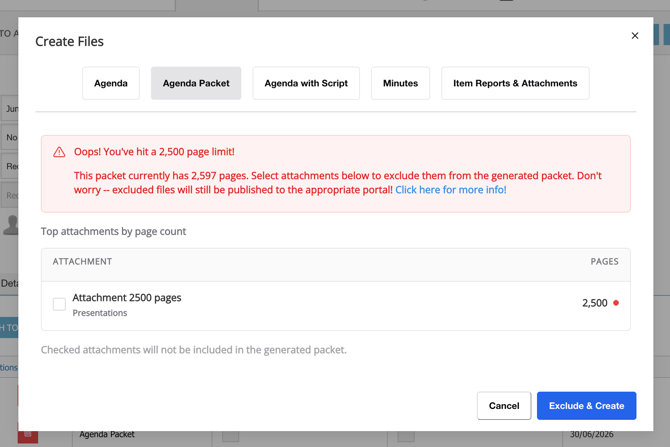
To protect the experience for the public, for users, and for machines, agenda packets are capped at 2,500 pages. If a packet would come to more than that, the Create Files window shows you which attachments are pushing it over and lets you leave them out, all without closing the window.
Why is there a limit?
Very large PDFs are slow to open, slow to download, and can be difficult for browsers, devices, and downstream systems to handle reliably. Capping the packet keeps it usable for everyone who opens it.
Steps
- On the agenda's Files tab, click + Create Files and select the Agenda Packet tab.
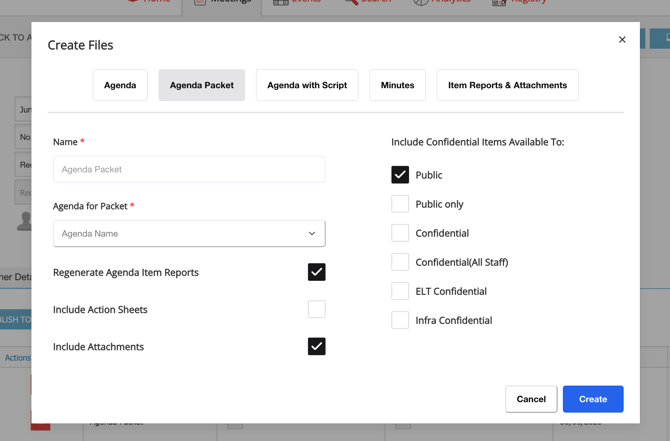
- Complete the packet options as usual and click Create.
- If the packet is over the limit, Resolve shows a warning listing the attachments over 40 pages, each with its page count.
- Tick the attachments you don't need in the packet.
- Click Create again to regenerate. The packet is built without the excluded files.
Solutions
- Remove the large attachments from the packet. Tick to exclude them in the warning so the packet generates without them. The attachments themselves are still present on the public portal — they're just not bundled into the single packet PDF, so the public can still access them.
- Use the Public Portal to navigate through all reports and attachments! Excluded attachments will still be there!