---
title: Resolve - Public Portal iFrame Code
description: How to publish the Resolve Public portal to your website.
---
[Skip to content](https://info.redmansolutions.com.au/resolve-knowledge-base/resolve-citizen-portal-embed-code#main-content)
[Submit Ticket](https://info.redmansolutions.com.au/resolve-knowledge-base/kb-tickets/new) [Customer portal](https://info.redmansolutions.com.au/tickets-view)

Open main navigation
Close main navigation
- [Submit Ticket](https://info.redmansolutions.com.au/resolve-knowledge-base/kb-tickets/new)
- [Customer portal](https://info.redmansolutions.com.au/tickets-view)
How can we help you?
- There are no suggestions because the search field is empty.
1. [Resolve Knowledge Base](https://info.redmansolutions.com.au/resolve-knowledge-base)
2. [Site Administrator](https://info.redmansolutions.com.au/resolve-knowledge-base/site-administrator)
# Resolve - Public Portal iFrame Code
## How to publish the Resolve Public portal to your website.
**Prerequisites:** This article applies to client IT or Website Administrators, providing guidance on the details to insert the Resolve public portal iFrame on your website.
Contact [Redman Solutions Helpdesk](mailto:help@redmansolutions.com) for any further clarification or assistance.
Below is an example of an iframe code you can use on your website.
You will need to apply your clientname to the URL. You may also need to adjust the height to best suit your amount of content.
The URL for Resolve public portal will be https://**clientname**.resolve.red/portal/
` `
You can also set Attributes in the URL to pre-filter for a specific meeting type. To obtain the Meeting Type ID #, use the public portal meeting filter (top of page) to select the desired meeting. Then copy the browser address bar URL to use as your iframe src URL.
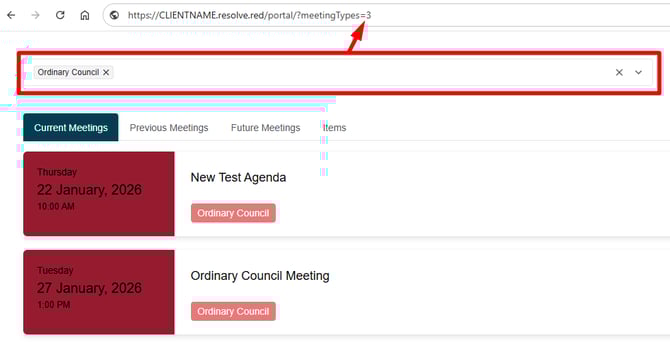
Example code for pre-filter on Meeting Type:
``
If you add the following script to your host page, the iframe will automatically adjust to the size of the content. Be sure to update the clientname and name/ID to match.
``
``
- [Councillor Portal](https://info.redmansolutions.com.au/resolve-knowledge-base/councillor-portal)
- [Meeting Admin](https://info.redmansolutions.com.au/resolve-knowledge-base/meeting-admin#main-content)
- [Minutes](https://info.redmansolutions.com.au/resolve-knowledge-base/meeting-admin#minutes)
- [Meeting Configuration](https://info.redmansolutions.com.au/resolve-knowledge-base/meeting-admin#meeting-configuration)
- [Report Writing](https://info.redmansolutions.com.au/resolve-knowledge-base/report-writing#main-content)
- [Getting Started](https://info.redmansolutions.com.au/resolve-knowledge-base/report-writing#getting-started)
- [Approvals](https://info.redmansolutions.com.au/resolve-knowledge-base/report-writing#approvals)
- [Site Administrator](https://info.redmansolutions.com.au/resolve-knowledge-base/site-administrator#main-content)
- [Media and Streaming](https://info.redmansolutions.com.au/resolve-knowledge-base/site-administrator#media-and-streaming)
- [Notifications](https://info.redmansolutions.com.au/resolve-knowledge-base/notifications)
- [Internal](https://info.redmansolutions.com.au/resolve-knowledge-base/internal)
- [General](https://info.redmansolutions.com.au/resolve-knowledge-base/general)
[](https://www.redmansolutions.com.au/)
Level 1, 40 McDougall St, Milton, QLD 4064
Contact Support: [help@redmansolutions.com](mailto:help@redmansolutions.com)
Copyright © 2025, Redman Solutions