
---
title: Resolve - Drive Minute Snippets with the Keyboard
description: Search and add Snippets with just using your keyboard.
---

[Skip to content](https://info.redmansolutions.com.au/resolve-knowledge-base/resolve-drive-minute-snippets-with-the-keyboard#main-content)

[Submit Ticket](https://info.redmansolutions.com.au/resolve-knowledge-base/kb-tickets/new) [Customer portal](https://info.redmansolutions.com.au/tickets-view)

![Resolve](https://info.redmansolutions.com.au/hs-fs/hubfs/resolve-logo.png?width=100&height=75&name=resolve-logo.png)

Open main navigation

Close main navigation

- [Submit Ticket](https://info.redmansolutions.com.au/resolve-knowledge-base/kb-tickets/new)
- [Customer portal](https://info.redmansolutions.com.au/tickets-view)

 How can we help you?

- There are no suggestions because the search field is empty.

1. [Resolve Knowledge Base](https://info.redmansolutions.com.au/resolve-knowledge-base)
2. [Meeting Admin](https://info.redmansolutions.com.au/resolve-knowledge-base/meeting-admin)

# Resolve - Drive Minute Snippets with the Keyboard

## Search and add Snippets with just using your keyboard.

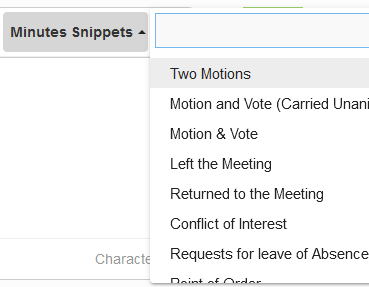
Once you have clicked in the Comment & Discussion text field of the minutes.

You can access the Minute Snippets by using Shift + Tab  
![](https://info.redmansolutions.com.au/hs-fs/hubfs/image-png-Feb-08-2024-01-45-58-4716-AM.png?width=369&height=287&name=image-png-Feb-08-2024-01-45-58-4716-AM.png)

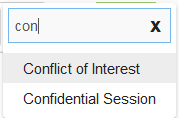
From here you can start typing or use the arrow keys to access your snippet.  
![](https://info.redmansolutions.com.au/hs-fs/hubfs/image-png-Feb-08-2024-01-46-17-7599-AM.png?width=179&height=118&name=image-png-Feb-08-2024-01-46-17-7599-AM.png)

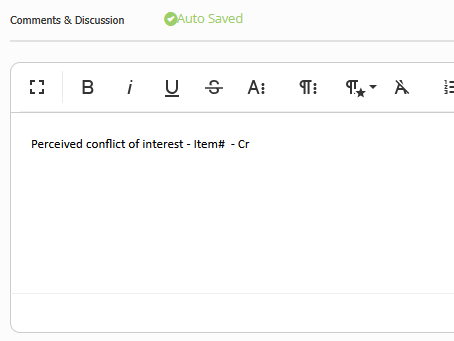
Once the snippet is selected hit return to apply it to the Comments & Discussion text box.  
![](https://info.redmansolutions.com.au/hs-fs/hubfs/image-png-Feb-27-2025-12-48-53-1229-AM.png?width=454&height=341&name=image-png-Feb-27-2025-12-48-53-1229-AM.png)

The snippet will be inserted the last place the cursor was prior to accessing the snippets.

If you have not clicked in the text box then the snippet will be applied at the top.


- [Councillor Portal](https://info.redmansolutions.com.au/resolve-knowledge-base/councillor-portal)
- [Meeting Admin](https://info.redmansolutions.com.au/resolve-knowledge-base/meeting-admin#main-content)

    - [Minutes](https://info.redmansolutions.com.au/resolve-knowledge-base/meeting-admin#minutes)
    - [Meeting Configuration](https://info.redmansolutions.com.au/resolve-knowledge-base/meeting-admin#meeting-configuration)
- [Report Writing](https://info.redmansolutions.com.au/resolve-knowledge-base/report-writing#main-content)

    - [Getting Started](https://info.redmansolutions.com.au/resolve-knowledge-base/report-writing#getting-started)
    - [Approvals](https://info.redmansolutions.com.au/resolve-knowledge-base/report-writing#approvals)
- [Site Administrator](https://info.redmansolutions.com.au/resolve-knowledge-base/site-administrator#main-content)

    - [Media and Streaming](https://info.redmansolutions.com.au/resolve-knowledge-base/site-administrator#media-and-streaming)
- [Notifications](https://info.redmansolutions.com.au/resolve-knowledge-base/notifications)
- [Internal](https://info.redmansolutions.com.au/resolve-knowledge-base/internal)
- [General](https://info.redmansolutions.com.au/resolve-knowledge-base/general)

[![redman-solutions-primary-logo-RGB\_transparent-1](https://info.redmansolutions.com.au/hs-fs/hubfs/Images/Logos/redman-solutions-primary-logo-RGB_transparent-1.png?width=400&height=113&name=redman-solutions-primary-logo-RGB_transparent-1.png "redman-solutions-primary-logo-RGB_transparent-1")](https://www.redmansolutions.com.au/)

Level 1, 40 McDougall St, Milton, QLD 4064

Contact Support: [help@redmansolutions.com](mailto:help@redmansolutions.com)

Copyright © 2025, Redman Solutions