
---
title: Resolve - Approval Workflow Options
description: If you are using the item approval option this will override the department approval
---

[Skip to content](https://info.redmansolutions.com.au/resolve-knowledge-base/resolve-item-category-approval-overrides-department-approval#main-content)

[Submit Ticket](https://info.redmansolutions.com.au/resolve-knowledge-base/kb-tickets/new) [Customer portal](https://info.redmansolutions.com.au/tickets-view)

![Resolve](https://info.redmansolutions.com.au/hs-fs/hubfs/resolve-logo.png?width=100&height=75&name=resolve-logo.png)

Open main navigation

Close main navigation

- [Submit Ticket](https://info.redmansolutions.com.au/resolve-knowledge-base/kb-tickets/new)
- [Customer portal](https://info.redmansolutions.com.au/tickets-view)

 How can we help you?

- There are no suggestions because the search field is empty.

1. [Resolve Knowledge Base](https://info.redmansolutions.com.au/resolve-knowledge-base)
2. [Report Writing](https://info.redmansolutions.com.au/resolve-knowledge-base/report-writing)

# Resolve - Approval Workflow Options

## Ways Approvals can be assigned in Resolve with Item Category and Department

1.Department Approvers  
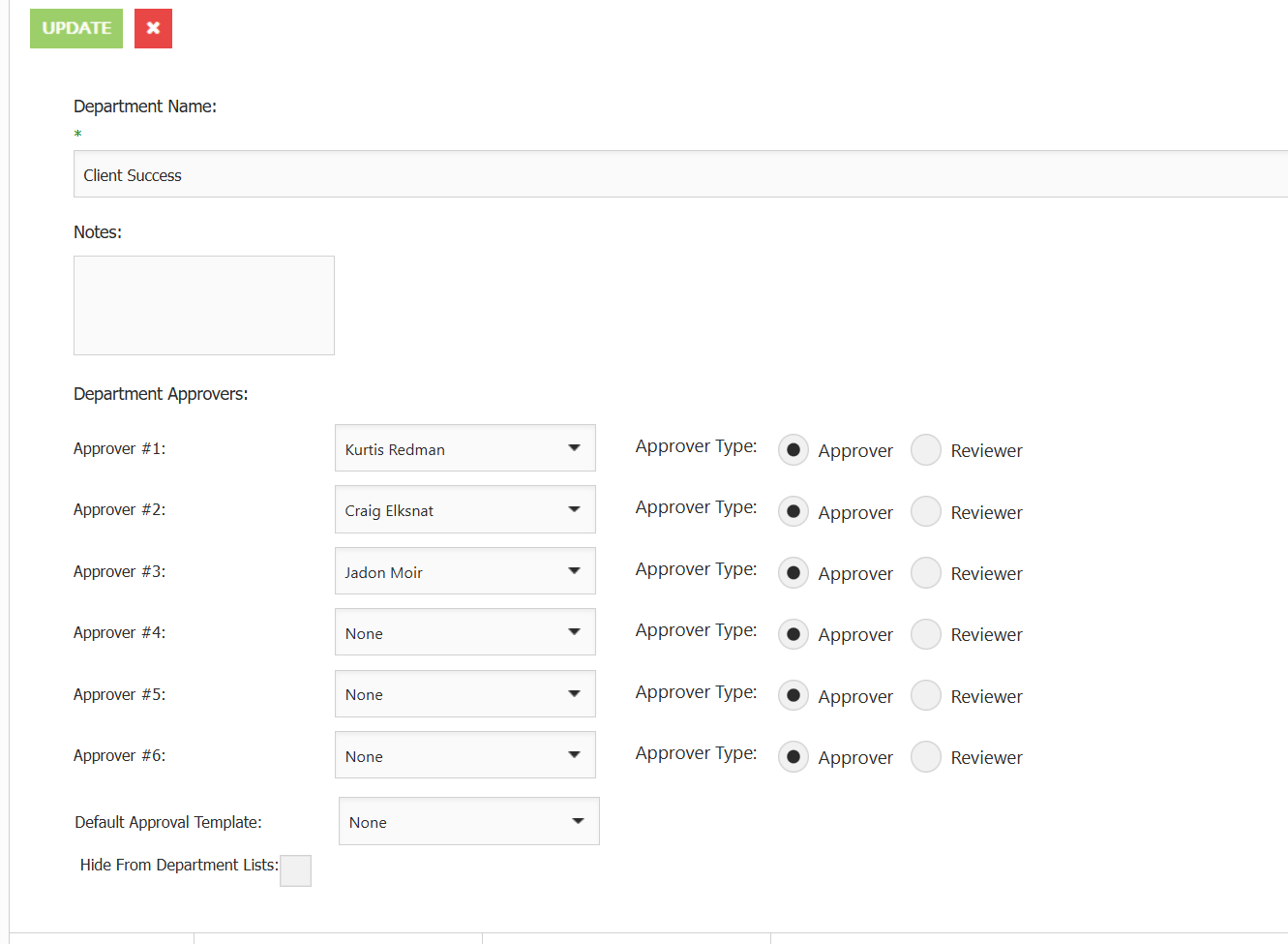
Departments can be set with Specific Approvers or an Approval Template  

![](https://info.redmansolutions.com.au/hs-fs/hubfs/image-png-Jan-06-2026-01-09-49-3741-AM.png?width=2055&height=272&name=image-png-Jan-06-2026-01-09-49-3741-AM.png)

Department Approvers - Users set here will be set as the approvals in order of an Item when created with the Department  
![](https://info.redmansolutions.com.au/hs-fs/hubfs/image-png-Jan-06-2026-01-09-42-5452-AM.png?width=1331&height=975&name=image-png-Jan-06-2026-01-09-42-5452-AM.png)

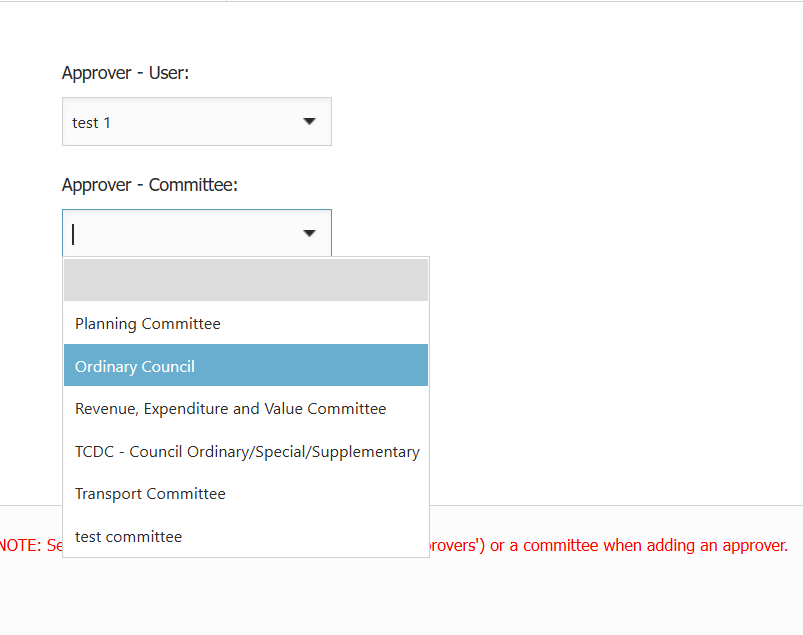
Approval Template - The Template of Approvers will be applied which allows users to be set as approvers as well as committees as approvers if applicable.  
![](https://info.redmansolutions.com.au/hs-fs/hubfs/image-png-Jan-06-2026-01-11-01-8798-AM.png?width=803&height=635&name=image-png-Jan-06-2026-01-11-01-8798-AM.png)


2. Item Categories  
Approvals can be assigned based on the Item Category used.

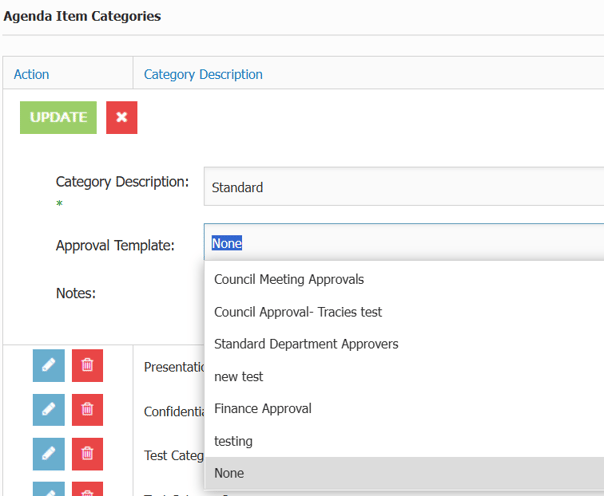
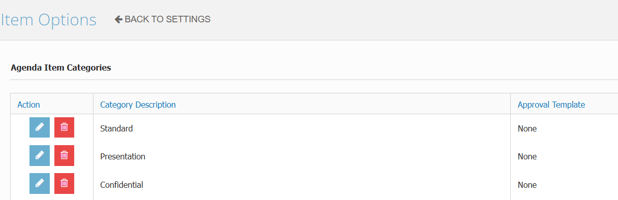
In Site Settings > Item Options - Setting an Approval Template per Item Category will always set the Approval Template to be used.
![](https://info.redmansolutions.com.au/hs-fs/hubfs/image-png-Jan-06-2026-12-45-25-7971-AM.png?width=604&height=498&name=image-png-Jan-06-2026-12-45-25-7971-AM.png)

Note:  
To avoid an Item Approval overriding department approvals, set the Item Approval to "None" in order for the Department Approval to be used.
![](https://info.redmansolutions.com.au/hs-fs/hubfs/image-png-Jan-06-2026-12-44-32-3134-AM.png?width=618&height=200&name=image-png-Jan-06-2026-12-44-32-3134-AM.png)


- [Councillor Portal](https://info.redmansolutions.com.au/resolve-knowledge-base/councillor-portal)
- [Meeting Admin](https://info.redmansolutions.com.au/resolve-knowledge-base/meeting-admin#main-content)


    - [Minutes](https://info.redmansolutions.com.au/resolve-knowledge-base/meeting-admin#minutes)
    - [Meeting Configuration](https://info.redmansolutions.com.au/resolve-knowledge-base/meeting-admin#meeting-configuration)
- [Report Writing](https://info.redmansolutions.com.au/resolve-knowledge-base/report-writing#main-content)


    - [Getting Started](https://info.redmansolutions.com.au/resolve-knowledge-base/report-writing#getting-started)
    - [Approvals](https://info.redmansolutions.com.au/resolve-knowledge-base/report-writing#approvals)
- [Site Administrator](https://info.redmansolutions.com.au/resolve-knowledge-base/site-administrator#main-content)


    - [Media and Streaming](https://info.redmansolutions.com.au/resolve-knowledge-base/site-administrator#media-and-streaming)
- [Notifications](https://info.redmansolutions.com.au/resolve-knowledge-base/notifications)
- [Internal](https://info.redmansolutions.com.au/resolve-knowledge-base/internal)
- [General](https://info.redmansolutions.com.au/resolve-knowledge-base/general)

[![redman-solutions-primary-logo-RGB_transparent-1](https://info.redmansolutions.com.au/hs-fs/hubfs/Images/Logos/redman-solutions-primary-logo-RGB_transparent-1.png?width=400&height=113&name=redman-solutions-primary-logo-RGB_transparent-1.png "redman-solutions-primary-logo-RGB_transparent-1")](https://www.redmansolutions.com.au/)

Level 1, 40 McDougall St, Milton, QLD 4064

Contact Support: [help@redmansolutions.com](mailto:help@redmansolutions.com)

Copyright © 2025, Redman Solutions