---
title: Teams Streaming using the (TEAMS)Customised streaming app
description: Teams Streaming Customised Streaming
---

[Skip to content](https://info.redmansolutions.com.au/resolve-knowledge-base/teams-streaming-using-the-teamscustomised-streaming-app#main-content)

[Submit Ticket](https://info.redmansolutions.com.au/resolve-knowledge-base/kb-tickets/new) [Customer portal](https://info.redmansolutions.com.au/tickets-view)

![Resolve](https://info.redmansolutions.com.au/hs-fs/hubfs/resolve-logo.png?width=100&height=75&name=resolve-logo.png)

Open main navigation

Close main navigation

- [Submit Ticket](https://info.redmansolutions.com.au/resolve-knowledge-base/kb-tickets/new)
- [Customer portal](https://info.redmansolutions.com.au/tickets-view)

 How can we help you?

- There are no suggestions because the search field is empty.

1. [Resolve Knowledge Base](https://info.redmansolutions.com.au/resolve-knowledge-base)
2. [Site Administrator](https://info.redmansolutions.com.au/resolve-knowledge-base/site-administrator)
3. [Media and Streaming](https://info.redmansolutions.com.au/resolve-knowledge-base/site-administrator#media-and-streaming)

# Teams Streaming using the (TEAMS)Customised streaming app

## There are many different ways to stream from teams to Resolve. This is one example using the Customised streaming app from Microsoft. 


**Assumption**  
You have meeting admin access to Resolve meetings and you have already been given rights to the customised streaming app in TEAMS 

In Microsoft Teams, create Team meeting (Please note the Customised Streaming app is not available in Teams webinar or town hall events.)

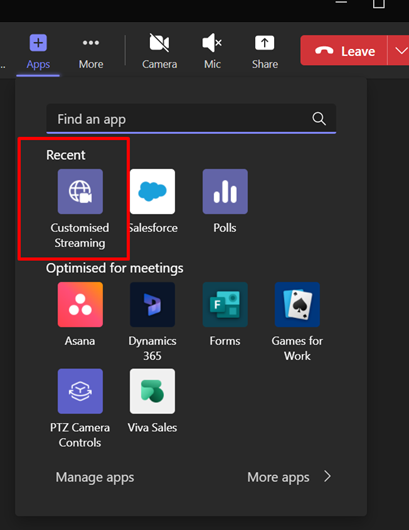
Once meeting started add Custom Streaming app  
![](https://info.redmansolutions.com.au/hs-fs/hubfs/image-png-Oct-30-2025-05-37-46-5551-AM.png?width=409&height=530&name=image-png-Oct-30-2025-05-37-46-5551-AM.png)

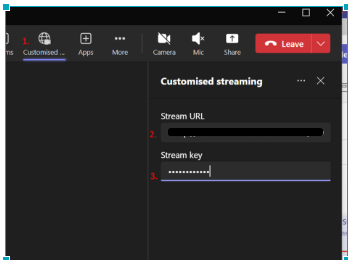
 Add below details to Custom Stream

![](https://info.redmansolutions.com.au/hs-fs/hubfs/image-png-Oct-30-2025-05-39-18-0865-AM.png?width=447&height=334&name=image-png-Oct-30-2025-05-39-18-0865-AM.png)


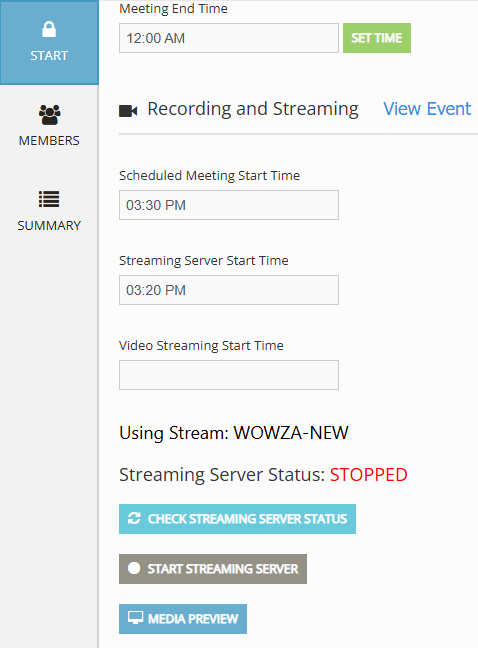
Ensure the Streaming server has started  
This will be scheduled to start 10 mins prior to your meeting time. 
| ![](https://info.redmansolutions.com.au/hs-fs/hubfs/image-png-Oct-30-2025-11-08-58-2549-PM.png?width=478&height=648&name=image-png-Oct-30-2025-11-08-58-2549-PM.png) | ![](https://info.redmansolutions.com.au/hs-fs/hubfs/image-png-Oct-30-2025-11-08-53-0532-PM.png?width=521&height=667&name=image-png-Oct-30-2025-11-08-53-0532-PM.png) |
| --- | --- |


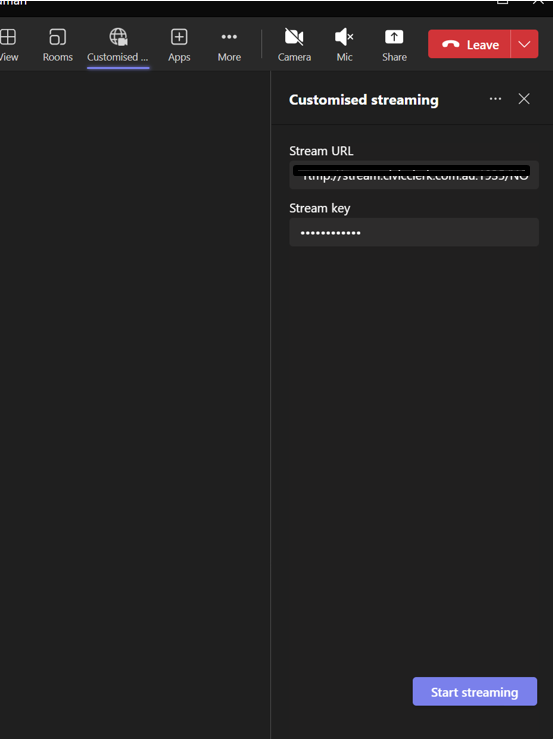
Select Start Streaming (This can be done 10 mins prior to the scheduled start time of the meeting, if you need to start streaming outside of this window you can select start streaming server in Resolve from the event or minute taking screen)
 ![](https://info.redmansolutions.com.au/hs-fs/hubfs/image-png-Oct-30-2025-05-40-52-9232-AM.png?width=553&height=739&name=image-png-Oct-30-2025-05-40-52-9232-AM.png)

 Streaming will then be set live in Resolve:

1. 1. Check Auto-bookmark when “Set current” is selected
     2. Set actual Start time – Click green \[SET TIME\] button
     3. The stream will now be live on the website.


End stream in Teams or close the meeting.

At end of the meeting, click \[END LIVE EVENT\] button in Resolve


- [Councillor Portal](https://info.redmansolutions.com.au/resolve-knowledge-base/councillor-portal)
- [Meeting Admin](https://info.redmansolutions.com.au/resolve-knowledge-base/meeting-admin#main-content)

    - [Minutes](https://info.redmansolutions.com.au/resolve-knowledge-base/meeting-admin#minutes)
    - [Meeting Configuration](https://info.redmansolutions.com.au/resolve-knowledge-base/meeting-admin#meeting-configuration)
- [Report Writing](https://info.redmansolutions.com.au/resolve-knowledge-base/report-writing#main-content)

    - [Getting Started](https://info.redmansolutions.com.au/resolve-knowledge-base/report-writing#getting-started)
    - [Approvals](https://info.redmansolutions.com.au/resolve-knowledge-base/report-writing#approvals)
- [Site Administrator](https://info.redmansolutions.com.au/resolve-knowledge-base/site-administrator#main-content)

    - [Media and Streaming](https://info.redmansolutions.com.au/resolve-knowledge-base/site-administrator#media-and-streaming)
- [Notifications](https://info.redmansolutions.com.au/resolve-knowledge-base/notifications)
- [Internal](https://info.redmansolutions.com.au/resolve-knowledge-base/internal)
- [General](https://info.redmansolutions.com.au/resolve-knowledge-base/general)

[![redman-solutions-primary-logo-RGB\_transparent-1](https://info.redmansolutions.com.au/hs-fs/hubfs/Images/Logos/redman-solutions-primary-logo-RGB_transparent-1.png?width=400&height=113&name=redman-solutions-primary-logo-RGB_transparent-1.png "redman-solutions-primary-logo-RGB_transparent-1")](https://www.redmansolutions.com.au/)

Level 1, 40 McDougall St, Milton, QLD 4064

Contact Support: [help@redmansolutions.com](mailto:help@redmansolutions.com)

Copyright © 2025, Redman Solutions